
Emails your customers receive
See which emails Payly sends your customers automatically, when each one goes out, what it contains, and which you can switch off.
Payly sends your customers a few emails automatically, at the moments they expect to hear from you: when they pay, when you ship, when you refund, and when a subscription renews. You do not set anything up, and you do not write these emails yourself.
Emails at a glance
| When your customer gets it | |
|---|---|
| Order confirmation | As soon as an order is paid. |
| Sign-in link | After each paid order, and whenever a customer asks for a link on your store's account page. |
| Order shipped | When you mark a physical order as shipped. Once per order. |
| Refund issued | Whenever money goes back on an order, including a partial refund. |
| Subscription renewed | Each time a subscription is charged again. Not for the first payment. |
| Renewal payment failed | Each time a renewal payment is declined. |
| Free trial ending | Three days before a free trial turns into a charge. Stripe subscriptions only. |
| Subscription cancelled | Once, on the day the paid period ends and the subscription stops. Scheduling a cancellation does not send it. |
What each email says
Order confirmation
Thanks the customer and shows their order number, the items, the totals and the shipping address. If the order includes digital downloads, the email includes the download links. The subject line names your store and the order number.
Sign-in link
Contains a Sign in button and a 6-digit code. Both work once and expire after 15 minutes. It is only sent to an email address that has an account on your store. See How customer accounts and sign-in work.
Order shipped
Tells the customer the order is on its way and lists the items. If you entered a carrier or tracking number when you marked the order as shipped, they are included. See Mark orders as shipped.
Refund issued
Shows how much was refunded and the order total. For a partial refund, it says how much of the order is left. It reminds the customer that the money returns to their original payment method. See Refund an order.
Subscription emails
- The renewal email is a receipt for that payment, with a link to manage the subscription.
- The failed payment email says the payment was declined, which usually means a card has expired or been replaced. It links to the subscription and tells the customer to reply if they want your help updating the card.
- The free trial email says when the trial ends and that the subscription will be charged then, unless the customer cancels first.
- The cancelled email confirms that the subscription has ended.
Who sends them and where replies go
- Every email carries your store name, and it is written in the language you chose for your store. See Choose your store's language.
- When a customer replies to an order, shipping, refund or subscription email, the reply goes to the email address on your Payly account.
- Emails about a test order start with [Test] in the subject line, so they cannot be mistaken for real ones.
See the list in your settings
Go to Settings > Emails. The Sent to your customers card lists the emails and their switches.
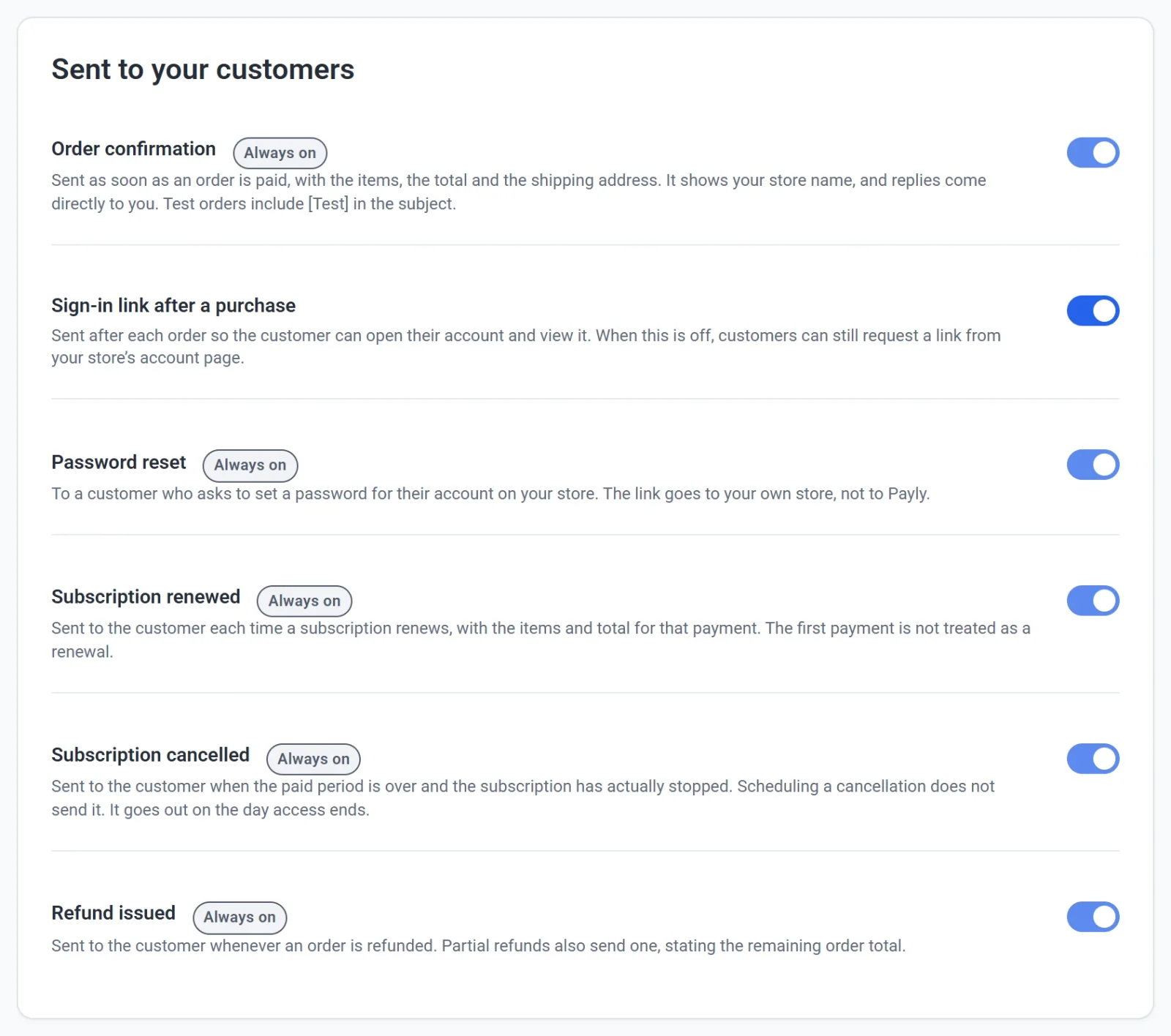
- Most rows show Always on. Your store depends on these emails, so they cannot be turned off.
- Sign-in link after a purchase has a switch. When you turn it off, customers no longer get a link right after they pay. They can still ask for one on your store's account page.
- The order shipped, renewal payment failed and free trial ending emails are sent too, although they are not listed on this screen.
- The Password reset row is not used. Shoppers on your store do not have passwords. They sign in with an emailed link or code.
Tip: To see exactly what your customers receive, turn on test mode, place a test order in your own store with your own email address, and open the confirmation. See Take test payments with test mode.
You cannot edit the wording of these emails. For the emails Payly sends to you, such as new order alerts, see Choose which emails you receive.