
Tips and limits for AI help
How to get good results from Build with AI and the Edit with AI chat, what the AI can't do, and how your monthly AI help works.
These tips are for Build with AI and the Edit with AI chat: how to get good results, what the AI can't do, and how much AI help you get each month.
Tips for good results
- Ask for one or two changes at a time. Each request is one step, so you can undo it on its own.
- Click a block before you say "this", "it" or "that".
- Say where things are as you see them, such as "the main headline", "the button under the photo" or "the second section".
- If the result isn't what you wanted, undo it and say it another way.
- Read the words the AI writes before you publish. It may fill in small details, such as delivery times or how long you've been in business.
When you change your store's colors, Payly keeps your words readable. If a color you ask for would make them hard to read, Payly adjusts it.
What the AI can't do
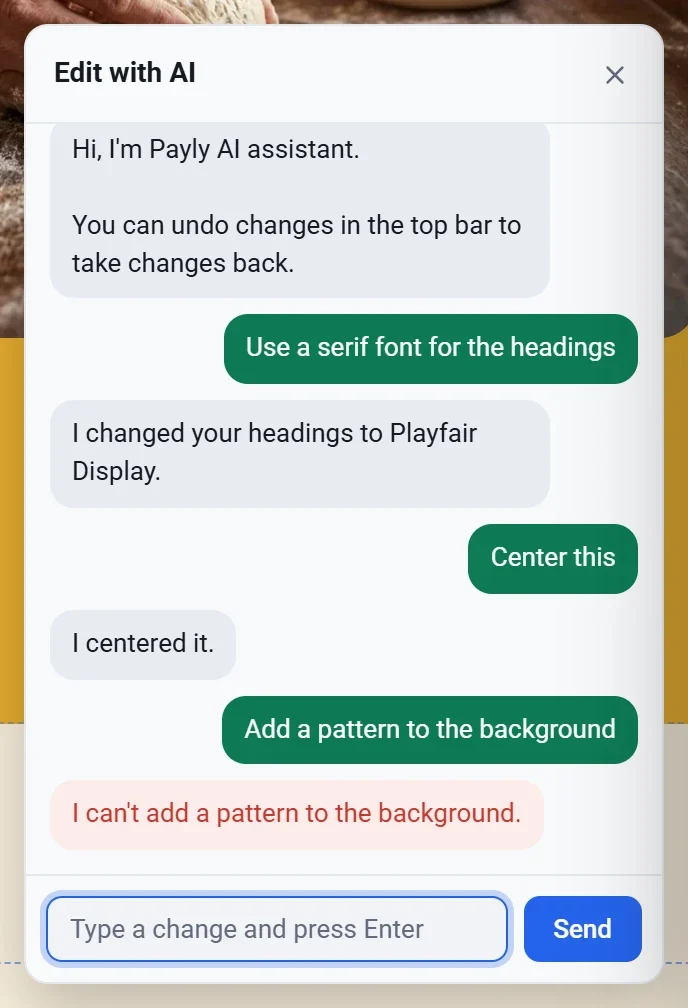
- Make images. Photos come from Payly's free photo library. To use your own, see Add images and use the media library.
- Change your store's products. Edit those in Products in your site dashboard. On a form, it can change the prices of its choices and tickets.
- Add or remove pages. It can change the links in your top menu and footer.
- Change a creator page's membership levels after the page is made. Change those on its Levels screen. See Set up membership levels.
- Change your settings, such as shipping, payments or your store's language.
- Publish your site.
- Remove a block your store needs, such as the cart on your cart page, or a question a form needs, such as a booking page's date and time. It can still move or resize a block.
When the chat can't do something, it says so.
How much AI help you get
Once you connect your free Cloudflare account, your AI help runs on that account. Cloudflare's free plan includes free AI every day, enough for hundreds of edits. Your site gets it the next time you publish. If you use up a day's free AI, your monthly AI help from Payly fills in until it starts again.
Before you connect Cloudflare, Payly gives each account a set amount of AI help each month. It starts again on the 1st.
- When you have about 10 free edits left for the day, the chat tells you how many remain and when they start again.
- When Payly's monthly AI help runs out, Edit with AI asks you to connect Cloudflare, then finishes your change.
- Everything else keeps working. You can still edit your site yourself, start a site from a design and publish.
On a paid Cloudflare plan, AI past the free amount is billed to your Cloudflare account. Each edit costs a tiny fraction of a cent.
If you see an error
| Message | What to do |
|---|---|
| We couldn't work that out. Try saying it another way. | Say what you want in other words, or ask for one thing at a time. |
| That didn't work. Try again in a moment. | Wait a moment, then send your request again. |
| Tell us a little more about your store. (Or your form, event, tip jar or page.) | In Build with AI, write a sentence or two about it. |
| You've used this month's AI help. To keep using it free every day, publish your site. | Publish your site. If it isn't connected to Cloudflare yet, Publish asks you to connect it. |
| You've used this month's building help. To keep using it free every day, publish a site. | Publish one of your sites, then use Build with AI again. |
| You've used today's AI help. It starts again at 5:00 PM. | Your free AI for today and your monthly AI help from Payly are both used up. Try again after the time shown, which is in your own time zone. |