Ask where guests are from
The Tour guide template asks Where are you visiting from? with every tip. Add a question of your own, such as Which tour did you join?, and read each answer beside its tip in your dashboard.
Tour guide tips, free
Hold up a QR code at the end of the tour. Guests scan it, pick a tip and pay with PayPal or a card, straight to your own account.
Start buildingPut a QR code that opens an online tip page on a sign or a card, and hold it up at the end of the tour. Guests scan it with a phone, choose an amount and pay by PayPal or card. Choose a tip page that pays your own account, and scan your printed code once yourself before the first tour.
The Tour guide template asks Where are you visiting from? with every tip. Add a question of your own, such as Which tour did you join?, and read each answer beside its tip in your dashboard.
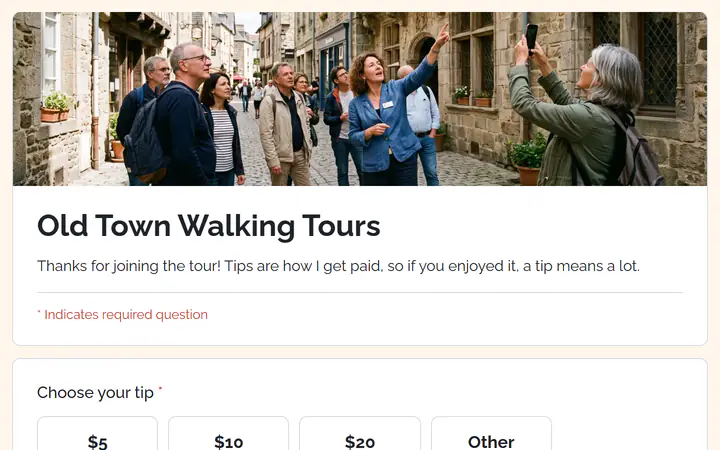
The template reads Thanks for joining the tour, with a line that tips are how you get paid. Stripe allows a tip only for something you have already provided, so ask after the tour, not before.
Set up to 8 suggested tips, and leave the Other box on for guests who want to give a different amount. The Other box starts with a minimum of $1.00.
You set it up once. Guests scan the code at the end of every tour.
In Your sites, click New, choose Tip jar and pick Tour guide. Change the title, the line under it and the header photo to your own.
Change the suggested amounts. Then connect PayPal, Stripe or both under Settings, Payments. Turn on Test mode first to tip yourself with sandbox accounts.
Click Publish. The first time, Payly asks you to connect your free Cloudflare account. Then click Download QR code under Share your form in Settings, and print it.
$0
Completely free - no paid plan, no transaction fees, no commission
PayPal and Stripe charge their standard processing fees, as they would on any platform.
How can this possibly be free?Start from one of these and change anything you like, or start from scratch.
Tips at the end of a tour, from a QR code the guide holds up.
No. They scan the code with a phone, type their email for the receipt and pay with PayPal or a card. A guest who misses the code can tip from the link, which you can send in a follow-up email.
Add a question such as Which tour did you join? Each answer arrives with its tip, under Donations in your dashboard, and you can download the table as CSV. Answers are private and do not show on the tip jar page. Read messages from supporters
Stripe allows a tip only for something you have already provided, so word the page as thanks for the tour, as the template does. Read Stripe's rules for tips before you share your link.
US dollars, unless you change Currency under Settings, General. If you guide outside the US, change it before you share your link. Set your store currency
Yes. There is no monthly fee, no transaction fee and no paid tier. PayPal and Stripe charge their standard processing fees on each payment, as they would on any platform. How can this possibly be free?
Make any of these from the same dashboard and get paid through your own PayPal or Stripe account. Payly takes no fees from any of them.
Your tip jar, your payment account, your supporters. The only thing you pay is normal PayPal and Stripe processing fees.
Start buildingNo credit card · No paid tier · No trials