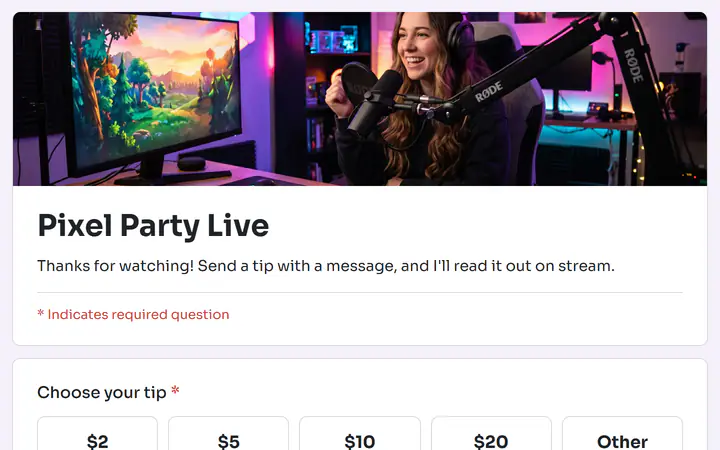
Read the message before you say it
A message arrives with each tip and stays private, in your dashboard, not on the tip jar page. It is saved once the tip is paid, so read it first, then read out the ones you like.
Live stream tips, free
Viewers pick a tip, add a message for you to read out, and pay with PayPal or a card. The tip goes straight to your own account, and Payly takes no fee on tips.
Start buildingPut one tip link where viewers already look, such as your bio and your stream. Send it to a page where people pick an amount, type a message and pay with PayPal or a card, with the money going to your own account. Word it as thanks for what you have done, and read each message yourself before you say it out loud. A Payly tip jar is that page.
A message arrives with each tip and stays private, in your dashboard, not on the tip jar page. It is saved once the tip is paid, so read it first, then read out the ones you like.
Share your tip jar's link anywhere a link works: your bio, your stream, your website or an email. Viewers need no account. They type an email for the receipt and pay with PayPal or a card.
Stripe allows a tip only for something you have already provided. The Live stream template thanks viewers for watching, and you can change the words. Keep them as thanks.
You set the amounts and the message question. Viewers tip. You read.
In Your sites, click New, choose Tip jar, then pick Live stream. It asks for a name and a Message to read on stream. Put your own words under the title.
Click the question that shows the amounts. Change them, add up to 8, and keep the Other box so viewers can type their own. The Design tab has your photo, colors and font.
Under Settings, connect PayPal, Stripe or both, then click Publish. The first time, Payly asks you to connect your free Cloudflare account, which hosts the page. Then share the link.
$0
Completely free - no paid plan, no transaction fees, no commission
PayPal and Stripe charge their standard processing fees, as they would on any platform.
How can this possibly be free?Start from one of these and change anything you like, or start from scratch.
Tips during a stream, with a message to read out.
Skip it. Messages are not shown on the tip jar page, so nobody sees one unless you read it out. In the Individual view you can delete the response, which removes the message but not the payment. To send a tip back, refund the payment.
Yes. The Live stream template starts with one-time tips. In the amounts question, tick Monthly under How often donors can give, and viewers get a switch between once and monthly. PayPal or Stripe charges each one. How monthly tips work
Open Donations in your dashboard, which is what a tip jar's screen is called. The Table view lists each tip with its date, amount, name, email and message. Download CSV opens the table in a spreadsheet.
Yes. Click Preview to see the tip jar the way a viewer does. On the Payments tab, turn on Test mode and tip yourself with sandbox accounts. Turn it off before you share your link. Test mode
Yes. There is no monthly fee, no transaction fee and no paid tier. PayPal and Stripe charge their standard processing fees on each payment, as they would on any platform. How can this possibly be free?
Make any of these from the same dashboard and get paid through your own PayPal or Stripe account. Payly takes no fees from any of them.
Your tip jar, your payment account, your supporters. The only thing you pay is normal PayPal and Stripe processing fees.
Start buildingNo credit card · No paid tier · No trials