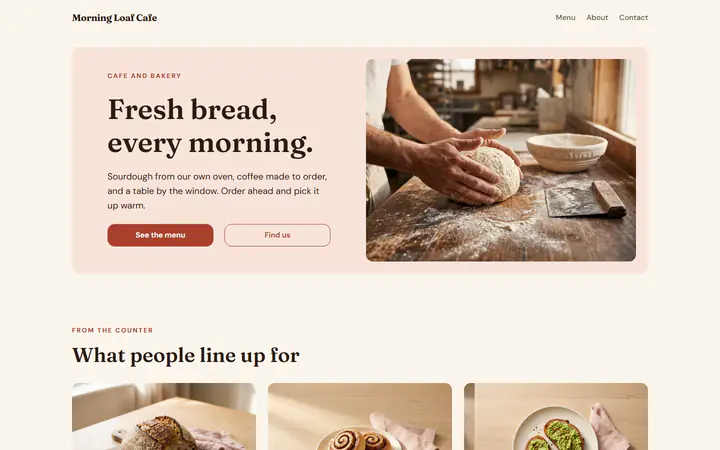
Order tonight, pick up at 7:30
When you are closed, your menu says so, and customers can still order for later. The Cafe and bakery design opens at 7 on weekdays. With food that takes 20 minutes and times every 15 minutes, the first pickup is 7:30.
Order ahead for cafes and bakeries, free
Customers order on the way in, or the night before, pick a pickup time and pay online. The money goes to your own PayPal or Stripe account, and Payly takes no fees.
Start buildingPut your menu online with a checkout that asks for a pickup time, and take payment when the order is placed, so every order made ahead is paid. Offer times inside your hours, a few minutes apart, and let early customers order the night before. Mark baked goods that sell out, so the menu stops offering them. Payly does all of this free, and PayPal or Stripe charges only its standard processing fee.
Most platforms meter what you build and charge you when you grow. We don’t. Everything below is included from the day you sign up, and your site carries your name, not ours.
When you are closed, your menu says so, and customers can still order for later. The Cafe and bakery design opens at 7 on weekdays. With food that takes 20 minutes and times every 15 minutes, the first pickup is 7:30.
When the cinnamon rolls run out, turn on Sold out today. The menu marks them, nobody can order them, and they turn back on by themselves the next day.
Cold Brew Coffee comes in Small for $5 or Large for $6, and Avocado Toast takes extra avocado for $2 or tomato for $1. The total updates as customers choose.
You set the menu and the pickup times. PayPal or Stripe collects each payment.
In Your sites, click New, choose Restaurant and pick Cafe and bakery. It comes with a sample menu of eight dishes, from a sourdough loaf to an espresso. Change any of them.
In Ordering, say how long an order takes, from 5 minutes up. Keep Order for later on, and choose how far ahead: the same day only, or up to 14 days.
Add your address in Settings > Business details, so customers know where to pick up. Connect PayPal or Stripe and publish to your own free Cloudflare account. Online ordering is on from the start.
$0
Completely free - no paid plan, no transaction fees, no commission
PayPal and Stripe charge their standard processing fees, as they would on any platform.
How can this possibly be free?Start from one of these and change anything you like, or start from scratch.
Yes. In Ordering, choose Different hours for online orders, such as until 2 PM while your doors stay open until 3. Outside those hours, customers can only order for later.
Their order page shows Order received, then Being made, then Ready for pickup, and it moves along as you press Accept and Ready on the Kitchen screen. Pressing Ready also emails them that the order is ready.
No. Every order is paid online when it is placed, with PayPal or a card through Stripe, straight to your own account. So an order made the night before is already paid.
Yes. Once your website is published, a dish you save is on your menu right away, with no publish. That goes for prices, photos and Sold out today.
Yes. There is no monthly fee, no fee per order and no commission. PayPal and Stripe charge their standard processing fees on each order, as they would on any platform. How can this possibly be free?
Make any of these from the same dashboard and get paid through your own PayPal or Stripe account. Payly takes no fees from any of them.
Your menu, your payment account, your customers. The only thing you pay is normal PayPal and Stripe processing fees.
Start buildingNo credit card · No paid tier · No trials
Payly puts no limits on your store. It runs on your own Cloudflare account, and Cloudflare’s free plan comfortably covers most stores. Ordinary pages are always free to serve; the visit counter, shop and product pages, your photos, the cart and checkout count toward the daily requests.
| Free plan | Paid plan, $5 a month | |
|---|---|---|
| Visitors | About 5,000 a day | About 16,000 a day, then $0.30 per extra million requests |
| Products | About 1,500, with a photo each | About 30,000, with a photo each |
| Orders | No limit | No limit |
| Photos and files | 500 MB per store, about 1,500 photos | 10 GB per store, about 30,000 photos (5 GB included, then $0.75 per GB a month) |
| Pages | 20,000 per store | 100,000 per store |
| Stores per Cloudflare account | 10 | 500 |
Products take almost no room on their own; it’s their photos that count. Orders, customers and subscriptions are kept by Payly, so they are never limited. The paid plan is paid to Cloudflare, in your own account, and only if you ever need it. Payly stays free either way. Visitor numbers are estimates for a typical store; Cloudflare’s limits as published October 2026.