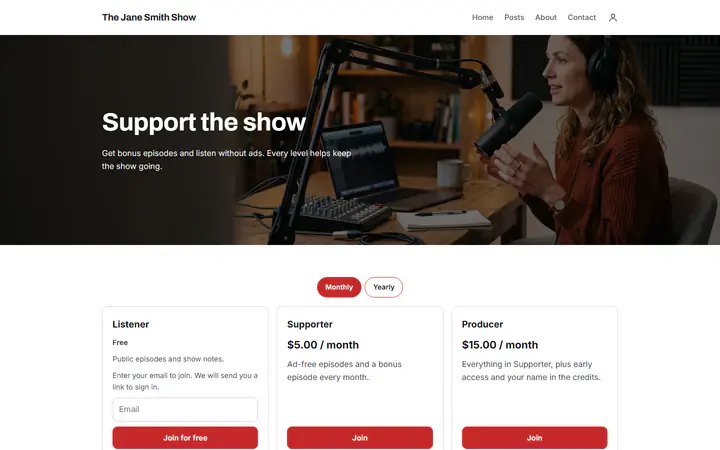
Levels built for a show
The Podcast template comes with three levels: Listener, Supporter and Producer, one of them free. Rename them, set a monthly price and an optional yearly one, and write what each level gets.
Podcast memberships, free
Give the listeners who want more bonus episodes, early access and a say in what you cover. They pay monthly or yearly into your own PayPal or Stripe account.
Start buildingGive paying listeners something the public feed does not have, such as bonus episodes, an ad-free version or early access. Set a monthly price, and a yearly one if you like, and use a membership tool that bills each member on schedule. On Payly that page is free, and listeners pay through your own PayPal or Stripe account, so Payly takes no cut. PayPal and Stripe still charge their standard processing fees.
The Podcast template comes with three levels: Listener, Supporter and Producer, one of them free. Rename them, set a monthly price and an optional yearly one, and write what each level gets.
Write a post with show notes and a link to the episode, then choose who sees it: all members, paid members, or a level and higher, such as Supporter and higher. Schedule it for release day.
Add a poll to a post with 2 to 10 choices, such as next month's guest, and an end date if you like. Members vote once, then talk it over in the comments, where your replies are marked Creator.
You make your episodes as you do now. Payly sells the levels and shows each post to the right listeners.
In Your sites, click New and choose Creator memberships, then pick Podcast. Change the photo and words to match your show.
In Levels, name each level, set its monthly price and, if you like, a yearly one, and list what listeners get. Close a level to new members whenever you want.
Connect your payment account and your free Cloudflare account, and publish your page once. Try the sign-up first in test mode, then write your first bonus episode post.
$0
Completely free - no paid plan, no transaction fees, no commission
PayPal and Stripe charge their standard processing fees, as they would on any platform.
How can this possibly be free?Start from one of these and change anything you like, or start from scratch.
Bonus episodes and listening without ads, with a free level.
No. A post holds formatted text, links and a cover image, and audio, video or files inside a post are not supported. Host the episode where you host your show and link to it from the post. Payly decides who can read the post; the place the link leads to decides who can listen.
No. Emailing members about a new post is not supported. Members find new posts when they visit your page, so tell listeners on the show when a bonus episode is up.
A free member can move up to a paid level from the account page on your site. Members who pay with Stripe can switch between paid levels there too, if Let customers switch plans is on in Settings, then Features. Members who pay with PayPal cannot change level themselves.
They cancel from their account and keep access until the end of the time they paid for. In Settings, then Features, you can choose to end access right away instead. Nothing is refunded for the unused time.
Yes. There is no monthly fee, no transaction fee and no paid tier. PayPal and Stripe charge their standard processing fees on each payment, as they would on any platform. How can this possibly be free?
Make any of these from the same dashboard and get paid through your own PayPal or Stripe account. Payly takes no fees from any of them.
Your page, your payment account, your members. The only thing you pay is normal PayPal and Stripe processing fees.
Start buildingNo credit card · No paid tier · No trials