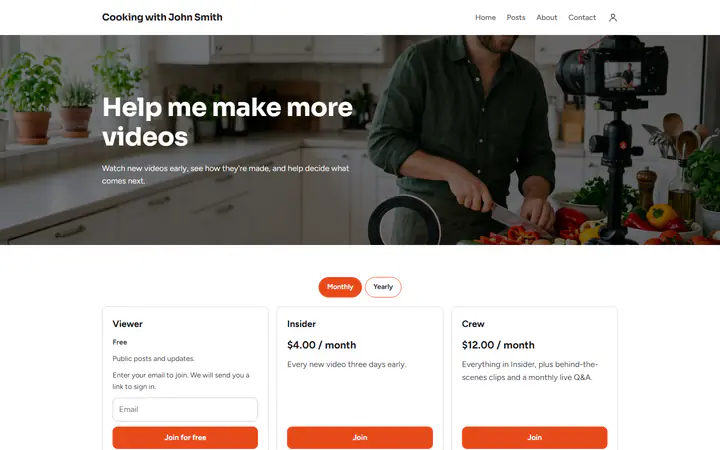
Early videos and extras by level
Give one level new videos three days early, and a higher level behind-the-scenes clips and a monthly live Q&A. A higher level also sees everything written for the levels below it.
Video memberships, free
Give viewers new videos early, behind-the-scenes clips and a say in what you make next. They pay monthly or yearly through your own PayPal or Stripe, and Payly takes no cut.
Start buildingGive people something extra to pay for: new videos early, behind-the-scenes clips, or a vote on your next topic. Offer a free level that fans join with an email, then paid levels at a monthly price. Members pay through your own PayPal or Stripe account, and your videos stay wherever you already host them.
Give one level new videos three days early, and a higher level behind-the-scenes clips and a monthly live Q&A. A higher level also sees everything written for the levels below it.
A post holds text, links and a cover image, not video files. Add your video's link to a members-only post. Visitors who are not members see only the post's title, date and cover.
Add a poll with 2 to 10 choices to a post, and each member votes once. Members can also comment on the post, and your replies carry a Creator badge.
You set the levels and link your videos. PayPal or Stripe collects each payment.
In Your sites, click New and choose Creator memberships, then Video creator. It comes with a free Viewer level and paid Insider and Crew levels. Change the names and prices.
Write what members get on each level's card, such as every video three days early. Set a monthly price for each paid level, and a yearly one if you like.
Connect PayPal or Stripe and your free Cloudflare account, and publish your page once. Then write a post, add your video's link and choose who can see it.
$0
Completely free - no paid plan, no transaction fees, no commission
PayPal and Stripe charge their standard processing fees, as they would on any platform.
How can this possibly be free?Start from one of these and change anything you like, or start from scratch.
New videos early, behind-the-scenes clips and a monthly Q&A, with a free level.
No. Video, audio and files inside a post are not supported. A post holds formatted text, links and a cover image, so keep your videos where you already host them and add each link to a members-only post.
Payly decides who can read the post, and your link sits inside it. It does not control the video itself, so choose a private or unlisted option where you host it, and check who can open it.
No. Emailing members about a new post is not supported. Members find new posts on your page, so tell viewers in your videos where to look.
Yes. Pick a date and time under Publish on and click Schedule, with no republish of your page. Payly uses the time zone of the computer you are working on. Publish your page once first.
Yes. There is no monthly fee, no transaction fee and no paid tier. PayPal and Stripe charge their standard processing fees on each payment, as they would on any platform. How can this possibly be free?
Make any of these from the same dashboard and get paid through your own PayPal or Stripe account. Payly takes no fees from any of them.
Your page, your payment account, your members. The only thing you pay is normal PayPal and Stripe processing fees.
Start buildingNo credit card · No paid tier · No trials